Most cookie banners fail GDPR requirements in ways that seem minor but carry real legal exposure. The pattern is consistent: Accept gets a bright button, Reject gets buried in a submenu, and non-essential scripts fire before the user touches anything. These aren’t edge cases—they’re the default output of most consent plugins left on factory settings.
This guide covers what a compliant banner actually requires, the mistakes that keep appearing in enforcement actions, and how to implement consent that holds up to scrutiny.
Short answer: A GDPR-compliant cookie banner requires freely given, specific, informed, and unambiguous consent — obtained before any non-essential cookies load. Reject must be as easy as Accept (same prominence, same number of clicks), pre-ticked boxes are prohibited, and you must log what each user consented to and when. If your banner makes rejection harder than acceptance, it isn’t compliant regardless of what your cookie policy says.
What GDPR Actually Requires for Cookie Consent
Cookie consent rules come from two overlapping sources: the ePrivacy Directive (often called the “Cookie Law”) and GDPR. The ePrivacy Directive requires consent before storing non-essential cookies on a device. GDPR defines what valid consent looks like. Understanding the distinction matters — see our explainer on ePrivacy Directive vs GDPR for the full picture.
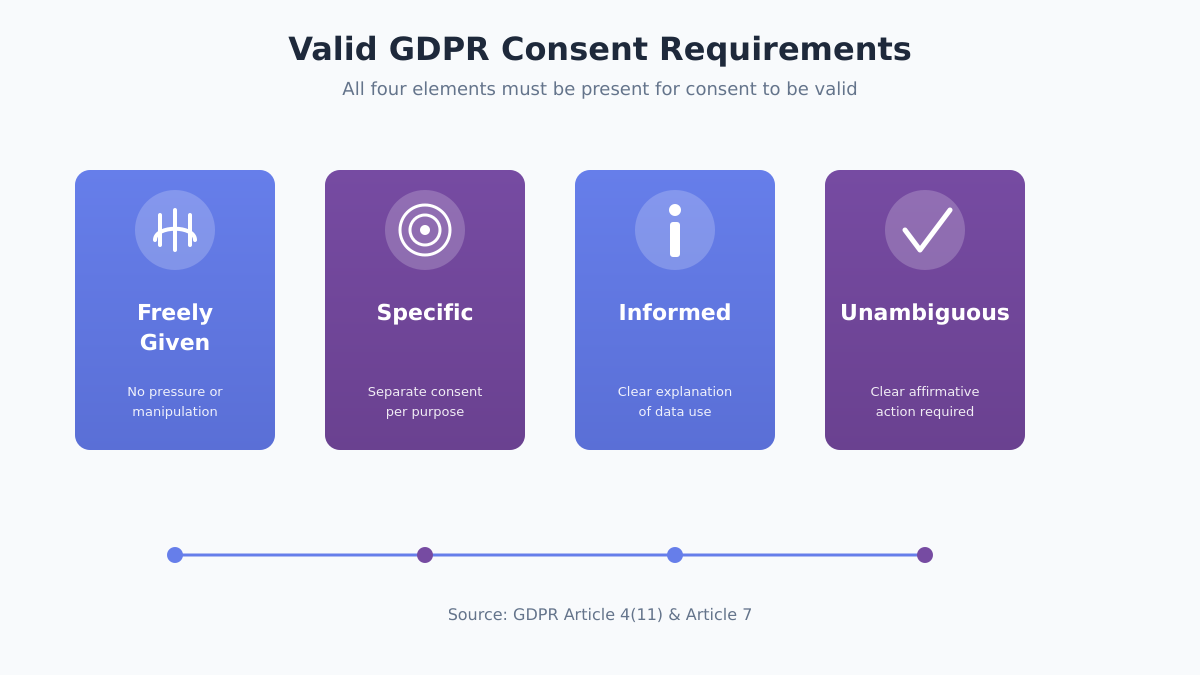
Valid consent under GDPR must be:
- Freely given — Users can’t be forced or manipulated into accepting
- Specific — Separate consent for different purposes (analytics vs. marketing)
- Informed — Clear explanation of what cookies do and who uses the data
- Unambiguous — Requires a clear affirmative action (clicking, toggling)
The European Data Protection Board (EDPB) has repeatedly clarified that scrolling, continuing to browse, or closing a banner does NOT constitute valid consent. Users must actively click to accept.
Which cookies need consent:
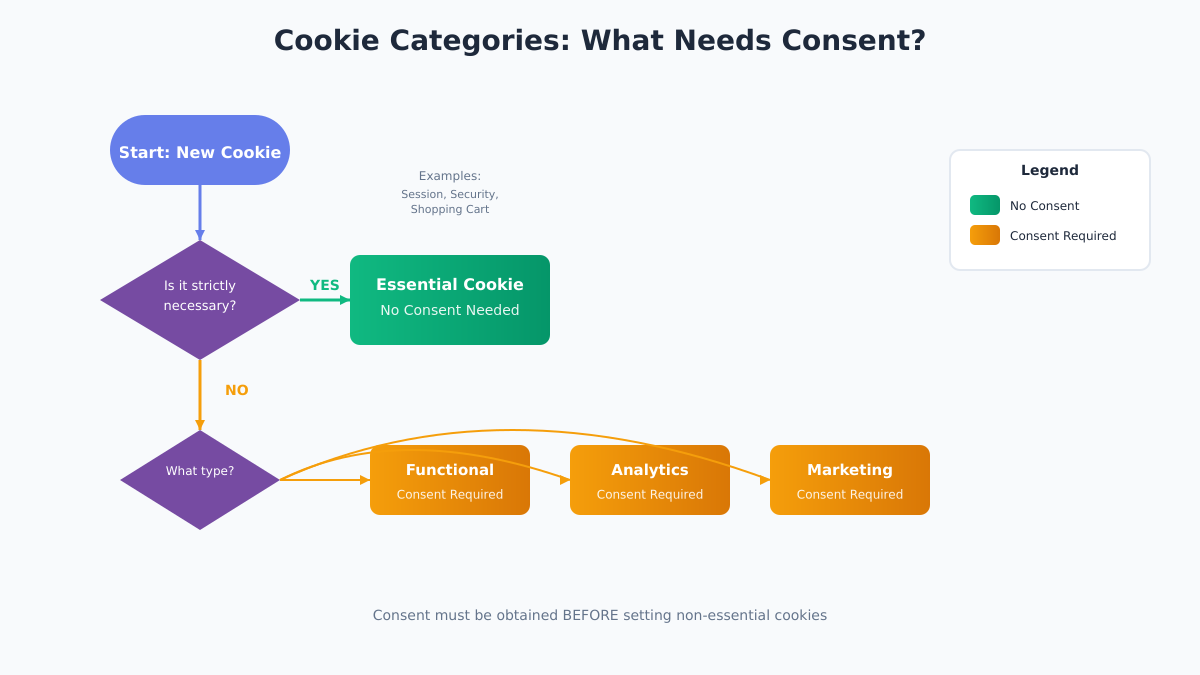
Not every cookie requires consent. The ePrivacy Directive exempts cookies that are “strictly necessary” for a service the user explicitly requested. Everything else needs consent BEFORE the cookie is set.
| Cookie Type | Consent Required | Examples |
|---|---|---|
| Strictly necessary | No | Session cookies, security tokens, shopping cart |
| Functional | Yes | Language preferences, user settings |
| Analytics | Yes | Google Analytics, Plausible, Matomo |
| Marketing | Yes | Ad tracking, retargeting pixels |
Even privacy-focused analytics tools like Plausible or Fathom technically require consent under ePrivacy in most EU countries, though some (like Germany) have more nuanced interpretations for cookieless analytics.
The 7 Most Common Cookie Banner Mistakes
These mistakes appear constantly in cookie implementations — and each one can invalidate your consent collection.
1. Pre-ticked checkboxes
The Planet49 ruling from the European Court of Justice in 2019 settled this: pre-ticked boxes don’t count as consent. Users must actively check the box themselves. This is non-negotiable.
Wrong: Checkboxes for “Analytics” and “Marketing” already selected
Right: All non-essential categories unchecked by default
2. Missing or hidden “Reject All” button
French regulator CNIL fined Google €150 million partly because rejecting cookies required multiple clicks while accepting took just one. The reject option must be equally prominent and require the same number of steps. If Accept is one click on the first layer, Reject must be too.
3. Cookie walls that block content
Forcing users to accept cookies to access your site generally violates the “freely given” requirement. The EDPB’s guidelines on consent specifically address this — consent isn’t free if refusing it means being locked out.
4. Confusing language and dark patterns
Using “Accept” as a bright green button and “Manage Preferences” as gray text creates unequal prominence. Both options must be visually equivalent — same size, similar color weight, same position in the hierarchy.
5. Auto-accepting on scroll or timer
Some banners claim that continuing to use the site constitutes consent. It doesn’t. GDPR requires a “clear affirmative action” — passive behavior doesn’t qualify, and no amount of small print in your cookie policy changes that.
6. Not keeping consent records
GDPR Article 7(1) places the burden of proof on the data controller. You need timestamped records of who consented, when, what version of the notice they saw, and what they agreed to. Without this, you can’t demonstrate compliance if a regulator asks.
7. Setting cookies before consent
Analytics and marketing scripts often fire the moment a page loads. If non-essential cookies are set before the user clicks “Accept,” the entire consent mechanism is broken at the technical level — no banner wording fixes this.
| Mistake | Risk Level | How to Fix |
|---|---|---|
| Pre-ticked boxes | High | Uncheck all non-essential by default |
| No “Reject All” | High | Add prominent reject button |
| Cookie wall | High | Allow access without consent |
| Dark patterns | Medium-High | Equal visual weight for all options |
| Auto-accept | High | Require explicit click |
| No records | Medium | Implement consent logging |
| Cookies before consent | High | Block scripts until consent given |
Essential vs. Non-Essential Cookies: What Needs Consent
Before building your cookie banner, audit every cookie your site sets. This determines what appears in your consent interface.
Strictly Necessary Cookies (No Consent Needed)
These cookies are exempt from consent requirements because your site genuinely cannot deliver the requested service without them. But “necessary” has a narrow definition — it means features the user explicitly requested, not features you find convenient to run.
Exempt examples:
- Shopping cart cookies for an e-commerce site
- Authentication session cookies
- Security cookies (CSRF tokens)
- Load balancing cookies
- Cookie consent preference storage
NOT exempt (even if you think they’re essential):
- Analytics cookies — even basic ones
- Social media widgets
- Live chat unless user initiates
- A/B testing cookies
Analytics Cookies
Yes, even privacy-friendly analytics tools typically require consent in the EU. Some providers like Plausible operate without cookies at all, which removes the consent requirement entirely. Others like Matomo can be configured for cookie-less tracking. If avoiding the consent overhead is a priority, switching to cookieless analytics is the cleanest solution — see our first-party data guide for how to approach measurement without the compliance burden.
Marketing and Advertising Cookies
These always require consent. Third-party advertising cookies from networks like Google Ads or Meta create the most complex consent scenarios because they involve data sharing with external parties — and those parties’ own processing chains.
Cookie Audit Checklist:
- List every cookie your site sets
- Identify the purpose of each cookie
- Determine who sets it (first-party or third-party)
- Note the expiration time
- Classify as strictly necessary, functional, analytics, or marketing
- Document in your cookie policy
Designing a Compliant Cookie Banner
A compliant banner isn’t just about having the right buttons — it’s about ensuring each choice is genuinely accessible. The design itself is part of the legal test.
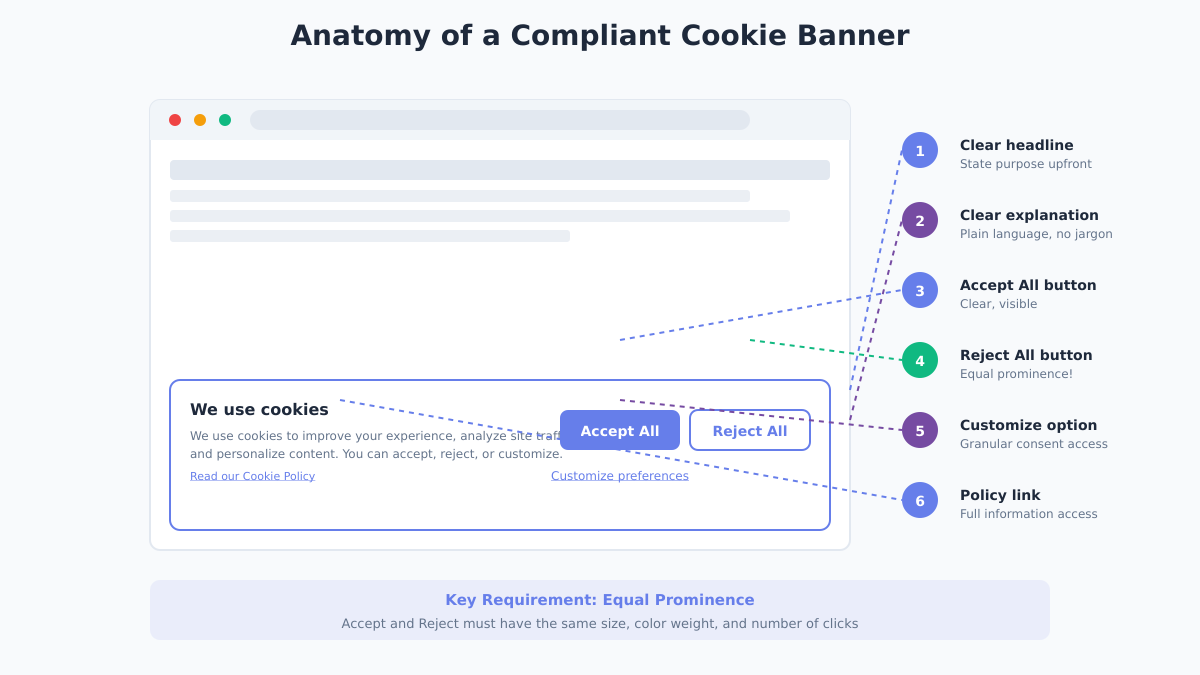
Required Elements
1. Clear headline stating purpose
Not just “We use cookies” — state what you use them for and why it affects the user.
2. Explanation of cookie categories
Brief description of each type and their purpose.
3. Accept All button
Clearly labeled, normal prominence.
4. Reject All button
Equally prominent as Accept. Same size, similar visual weight, not hidden. This is the most commonly violated element in real-world banners.
5. Manage Preferences / Customize option
Links to granular controls.
6. Link to full cookie policy
Complete information must be accessible.
Placement and Timing
The banner must appear on the first visit, before any non-essential cookies load. Common placements each have trade-offs:
- Bottom bar — Less intrusive but can be overlooked
- Top bar — Visible but can feel aggressive
- Center modal — Ensures attention but interrupts (avoid blocking content entirely)
Whatever placement you choose, ensure it doesn’t block access to the underlying content — that’s cookie wall territory.
Color and Visual Design
The CNIL’s guidelines on cookie consent are explicit that design must not nudge users toward accepting. Regulators are looking at this now — it’s not a theoretical concern.
Equal prominence means:
- Accept and Reject buttons are the same size
- Similar color saturation (not bright vs. gray)
- Same location prominence (not Accept at top, Reject buried below)
- Same number of clicks to complete either action
Avoid:
- Green for Accept, gray for Reject
- “Accept All” as button, “Reject” as small text link
- Hiding Reject in a submenu
Clear Language
Write for the person who just arrived on your site, not for a lawyer reviewing the policy. Plain language is a legal requirement under GDPR, not just good UX.
Instead of: “We utilize cookies and similar tracking technologies to enhance your browsing experience and deliver personalized content pursuant to…”
Write: “We use cookies to remember your preferences, understand how you use our site, and show relevant ads. You can accept all, reject non-essential cookies, or customize your choices.”
Implementing Granular Consent Options
GDPR requires specific consent — users must be able to consent to some purposes while rejecting others. A single “Accept All” with no real alternative fails this requirement.
Category-Level Toggles
The preference center should show categories with individual toggles:
Strictly Necessary    [Always On - Cannot Toggle]
Functional Cookies    [Toggle Off/On]
Analytics Cookies     [Toggle Off/On]
Marketing Cookies     [Toggle Off/On]
Each category needs a brief, plain-language explanation. “Analytics cookies help us understand how visitors use the site” is enough. “These cookies enable us to leverage behavioral data to optimize conversion funnels” is not.
Storing Consent Properly
When a user makes a choice, store it in a way that:
- Doesn’t require additional cookies you don’t have consent for
- Persists across sessions
- Can be exported for audit purposes
Basic approach using localStorage with a consent cookie:
// Store consent preferences
function saveConsent(preferences) {
  const consent = {
    timestamp: new Date().toISOString(),
    categories: preferences,
    version: '1.0'
  };

  // Essential cookie to remember preference
  document.cookie = `consent=${JSON.stringify(consent)}; max-age=31536000; path=/; SameSite=Lax`;

  // Enable/disable scripts based on consent
  if (preferences.analytics) {
    loadAnalytics();
  }
  if (preferences.marketing) {
    loadMarketing();
  }
}
Server-Side Consent Logging
For audit purposes, log consent events server-side:
{
  "user_id": "anonymous_hash_abc123",
  "timestamp": "2026-01-12T14:30:00Z",
  "consent_version": "1.0",
  "categories_accepted": ["functional", "analytics"],
  "categories_rejected": ["marketing"],
  "banner_version": "2.1",
  "ip_country": "DE"
}
This provides the proof required by Article 7(1) without storing personal data. The user identifier should be a hash or session token — not an IP address or anything that identifies the individual.
Consent Management Platforms: When You Need One
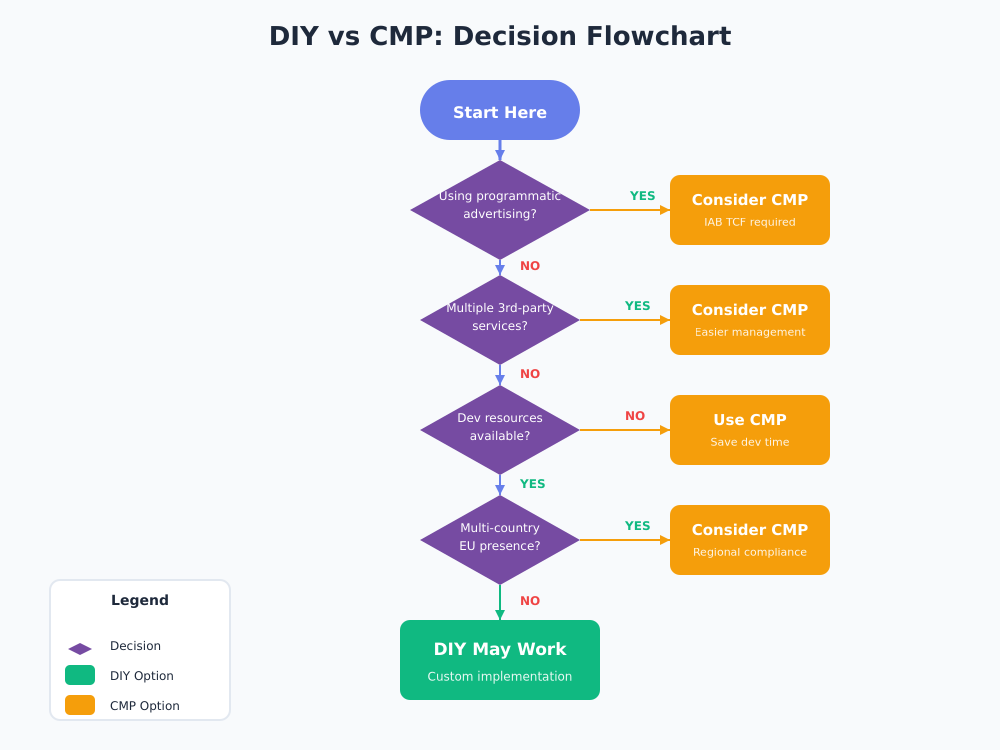
You have two options: build consent management yourself or use a dedicated Consent Management Platform (CMP). Neither is inherently better — it depends on your cookie footprint and how many jurisdictions you operate in.
When DIY Works
If your site:
- Uses few cookies (mainly essential + one analytics tool)
- Doesn’t use third-party advertising
- Has development resources to maintain the implementation
- Operates in limited jurisdictions
A custom implementation gives you full control and avoids the overhead (and third-party scripts) that CMPs themselves introduce.
When You Need a CMP
Consider a dedicated platform if:
- You use multiple third-party services
- You run programmatic advertising
- You need IAB TCF 2.2 compliance for ad networks
- You operate across many EU countries with varying interpretations
- You need detailed consent reporting and audit trails
Privacy-Respecting CMP Options
Several CMPs focus on privacy-friendly implementations:
| Platform | Privacy Focus | Open Source | Pricing |
|---|---|---|---|
| Cookiebot | Strong | No | Free tier, then paid |
| Osano | Strong | No | Free tier available |
| Termly | Good | No | Free tier available |
| Klaro | Strong | Yes | Free (self-hosted) |
If you’re considering a CMP, check out our tool reviews section for detailed comparisons.
Storing and Proving Consent
Under GDPR, the burden of proof falls on you — not on the regulator to prove you violated something. If a DPA investigates and you can’t show that a specific user consented to specific purposes at a specific time, you’re exposed.
What Records to Keep
For each consent event:
- Timestamp of when consent was given
- Which version of the consent notice was shown
- What categories were accepted/rejected
- Some form of user identifier (can be anonymized)
- How consent was collected (banner version)
How Long to Store
Keep consent records for as long as you process data based on that consent, plus reasonable time for potential audits. ICO guidance suggests maintaining records to demonstrate compliance for the duration of processing.
Re-Consent Requirements
You must obtain new consent if:
- You add new cookie categories
- You change data processing purposes significantly
- Your consent mechanism was found non-compliant
- Enough time has passed (industry standard: 6-12 months, though GDPR sets no fixed period)
Dark Patterns to Avoid (With Real Examples)
The EDPB’s guidelines on deceptive design patterns identify specific manipulation techniques that invalidate consent. These aren’t hypothetical — they’re the basis for real enforcement actions. See the GDPR fines overview for recent examples of what regulators have actually penalized.
Recent Enforcement
- Google (France) — €150M fine for making rejection harder than acceptance
- Amazon (Luxembourg) — €746M for personalized advertising without valid consent. A Luxembourg court annulled the penalty on procedural grounds in 2026, but the underlying violation findings stood
- Meta (Ireland) — €390M for running targeted ads on the wrong legal basis instead of asking for consent (2023)
Common Dark Patterns in Cookie Banners
| Dark Pattern | What It Looks Like | Compliant Alternative |
|---|---|---|
| Misdirection | Bright “Accept All,” gray “Options” | Same visual weight for all choices |
| Confirm shaming | “No, I don’t care about my experience” | Neutral “Reject All” |
| Hidden rejection | Reject buried in submenu | Reject on first layer |
| Forced action | Accept to access content | Allow content access without consent |
| Privacy maze | 5+ clicks to reject | Same clicks for accept and reject |
| Nagging | Banner appears every page | Show once, respect choice |
The core principle: if your design pushes users toward accepting, it undermines the “freely given” requirement — regardless of what’s written in your privacy policy.
FAQ
Do I need a cookie banner if I only use essential cookies?
If you truly only use strictly necessary cookies, you don’t need a consent banner. You should still inform users about these cookies in your privacy policy. The catch: most sites use at least one non-essential cookie (analytics, preferences, embedded widgets) without realizing it. Run a technical audit first — browser developer tools or a tool like Cookie Inspector will show you everything being set on page load.
Can I use “legitimate interest” for analytics cookies?
No. The ePrivacy Directive requires consent for non-essential cookies regardless of which legal basis you choose under GDPR. Legitimate interest is a valid basis for some data processing activities, but it doesn’t override the cookie consent requirement. The two legal frameworks operate in parallel — you need to satisfy both.
How often should users see the consent banner?
Once per decision. After a user accepts or rejects, don’t show the banner again until:
- Their consent expires (typically 6-12 months — check your CMP’s default)
- You change your cookie categories significantly
- They clear their browser data
- They specifically want to change preferences (provide an accessible link in the footer)
What happens if someone withdraws consent?
GDPR requires withdrawal to be as easy as giving consent. That means a “Cookie Preferences” link in the footer, and immediately stopping non-essential cookies for that user when they withdraw. You can’t make them jump through extra steps to undo something they accomplished in one click.
Is a cookie wall ever legal?
Rarely. Forcing users to accept cookies to access content violates the “freely given” requirement in most cases. The EDPB has taken a skeptical view of cookie walls since its 2020 consent guidelines, though it has acknowledged edge cases where a pay-or-consent model might be permissible. For a content site or SaaS, assume a cookie wall is non-compliant unless you have legal advice saying otherwise.
Implementation Checklist
Use this checklist to audit your current implementation or guide a new one:
Before Launch:
- Audit all cookies your site sets
- Classify each cookie by category
- Block non-essential cookies until consent is given
- Create clear, jargon-free category descriptions
- Write a comprehensive cookie policy
Banner Design:
- Accept All button present
- Reject All button equally prominent
- Manage Preferences option available
- Link to cookie policy
- Mobile-responsive design
- No dark patterns
Functionality:
- Non-essential scripts don’t load before consent
- Consent choice is stored appropriately
- Server-side logging captures consent events
- Users can change preferences later
- Preference link accessible in footer
Ongoing:
- Re-show banner when categories change
- Audit consent logs quarterly
- Test that blocked scripts stay blocked
- Update consent text when adding new cookies
- Review for dark patterns annually
The fastest way to reduce your consent complexity is to reduce your cookie footprint. Start by auditing what third-party scripts have added without your explicit decision — most sites have more than they realize. If you want to eliminate the consent requirement for analytics entirely, explore our guide to privacy-first analytics alternatives that operate without cookies. For broader measurement strategy without invasive tracking, see our Cookieless Marketing guides.