

Most keyword research tutorials assume you’re fine with sending your audience data to a dozen third-party tools and letting Google piece together everything your visitors are looking for. If you’re building a privacy-first site, that model is broken before you start. The good news: you don’t need any of it. Search intent is a public phenomenon. You can find what people are searching for without surveilling them.
This guide covers the methods that actually work — using public data sources, on-page signals, and tools that don’t require invasive tracking to give you useful keyword intelligence.
Short answer: Keyword research without tracking users means relying on public search data — Google Search Console, autocomplete, competitor gap analysis, and aggregated tools like Ahrefs or Ubersuggest — rather than behavioral data collected from your own visitors. You get term ideas and volume estimates without cookies, pixels, or consent walls. The resulting keyword list is often sharper because it’s based on what people actually search for, not what your existing traffic happens to click.
Why Tracking Users Isn’t Part of Keyword Research Anyway
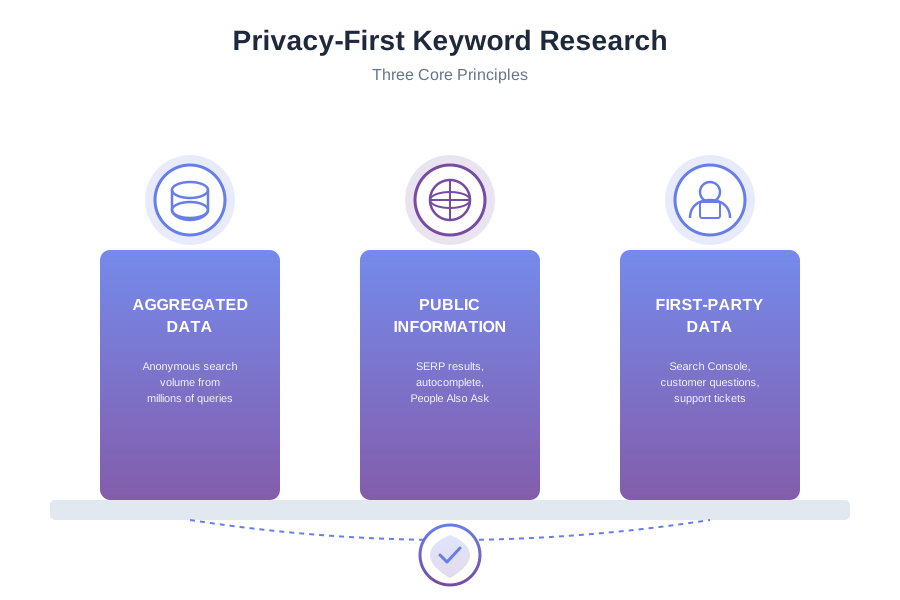
There’s a persistent confusion here worth clearing up. Keyword research is about understanding what people type into search engines before they visit your site. That data lives in search engines, not in your analytics stack. Google doesn’t hand you real-time query logs — it gives you aggregated, anonymized data through Search Console. Bing does the same through Webmaster Tools.
The “tracking” that supposedly helps with keyword research usually means session recordings, on-site search queries, or behavioral segmentation — tools like Hotjar, Clarity, or GA4’s exploration reports. These are useful for conversion optimization on pages that already rank. They’re not necessary for finding the right keywords to target in the first place. Strip them out and you lose nothing that matters at the research stage.
Start With Google Search Console (Your Best Free Source)
If your site has any traffic at all, Google Search Console is the most honest keyword data you’ll ever get. It shows you the exact queries that triggered impressions and clicks — no extrapolation, no sampling above a certain threshold. It’s aggregate data, collected server-side by Google, and it tells you what your content already attracts.
Three things to do in Search Console that most people skip:
- Filter by Queries with high impressions but low CTR. These are keywords where Google is already showing your pages but searchers aren’t clicking. That’s usually a title or meta description problem, not a content problem — and the keyword is already validated.
- Export the full query list and sort by position 5–20. These are your “almost ranking” pages. A targeted content improvement or additional internal link can move them onto page one. This is the highest-ROI keyword work you can do on an established site.
- Cross-reference queries with your pages using the “Pages” filter. See which queries are landing on pages that weren’t written for them. That’s a gap — either update the existing page or create a dedicated one.
Search Console gives you data on real searches from real people who found (or almost found) your site. No cookies, no pixels, no consent required on your end — Google handles all of that separately.
Autocomplete and People Also Ask: Free, Public, Unfiltered
Google’s autocomplete suggestions and “People Also Ask” boxes are based on aggregate search patterns across millions of users. That data is entirely public — you don’t need to track anyone to access it. You just need to look.
Autocomplete method: Open an incognito window (so your own search history doesn’t pollute the suggestions) and type your seed keyword. Note every suggestion. Then add each letter of the alphabet after your keyword and note those too. This is tedious but it surfaces long-tail variations that tools often miss because the volume is too low to appear in paid databases.
People Also Ask: Search your target query and expand several PAA boxes. Each answer Google pulls in is optimized for a specific sub-question. Those sub-questions are keyword targets. Write a section of your article that directly answers one of them and you have a clear shot at the PAA box.
Tools like AnswerThePublic automate this by pulling autocomplete data in bulk. The free tier is limited to a handful of searches per day, but it’s enough for targeted research on a specific topic. The data source is Google and Bing autocomplete — no user tracking involved.
Competitor Gap Analysis Without Installing Spyware
Knowing what your competitors rank for is not surveillance. That ranking data is assembled by crawlers, not by tracking individual users. Tools like Ahrefs, Semrush, and Moz Keyword Explorer build their databases by crawling search results and index pages — the same way Google does. Your competitors have no idea you’re looking, and no user is being tracked in the process.
The workflow:
- Pick three to five competitors who are roughly your size (similar DR, similar age, similar topic focus). Don’t benchmark against Moz or Search Engine Journal if you’re a one-person blog.
- Run a content gap analysis — most tools have this built in. It shows you which keywords your competitors rank for that you don’t.
- Filter for keywords where multiple competitors rank but you don’t. If three sites covering your topic all rank for the same term and you don’t cover it, that’s a clear gap in your content.
- Filter further by intent. Informational queries (how-to, what-is, guide, checklist) are content opportunities. Commercial queries (best, vs, review, pricing) are product or comparison page opportunities.
The keyword volume numbers in these tools are estimates — they’re interpolated from clickstream panels and aren’t precise. Treat them as relative signals, not exact measurements. A keyword showing 800 monthly searches might get 300 or 1,500. Use volume to separate “worth writing about” from “too niche for now,” nothing more.

Free and Low-Cost Tools That Don’t Need Your Visitors’ Data
You have options at every price point. Here’s what actually works:
Google Keyword Planner
Free with a Google Ads account (you don’t have to run ads). Enter a seed keyword and get related term ideas with broad volume ranges. The ranges are frustratingly wide — “100–1K” tells you almost nothing. Use it for direction and idea generation, not precision targeting. The data comes from Google’s own search index, not from tracking your site’s visitors.
Ubersuggest (Free Tier)
Ubersuggest provides keyword ideas, volume estimates, and difficulty scores. The free tier limits daily searches but is sufficient for focused research sessions. It pulls from Google’s data and its own crawl database — no cookies on your site required.
Bing Webmaster Tools
Completely free and massively underused. Bing Webmaster Tools has a keyword research section that shows search volume from Bing’s index. Bing’s market share is small but real, and the tool surfaces queries that sometimes differ from what Google prioritizes. Worth fifteen minutes to set up if you haven’t already.
Reddit and Forums
Search Reddit’s relevant subreddits for your topic. Read the threads. The language people use when they’re confused, frustrated, or excited about something in your niche is the language they type into Google. You can’t get this from a keyword tool because it requires reading actual human conversation, not just search strings.
This isn’t metaphorical advice — it’s specific: find the three subreddits where your audience hangs out, search them for your topic, and read a few dozen recent threads. You’ll come away with terminology, questions, and angles that no keyword database captures cleanly.
Measuring Keyword Performance Without User Tracking
Once you’ve published content targeting specific keywords, you need to know whether it’s working. Here’s where the privacy-first approach diverges from the conventional playbook — and where it’s actually simpler.
Google Search Console for ranking tracking: The Performance report shows you average position for each query. Set the date range to 28 days and compare to the previous 28 days. If your target keyword’s average position improved from 18 to 9, that’s meaningful movement — and you can see it without a single cookie on your site.
Privacy-respecting analytics for traffic attribution: Tools like Plausible and Fathom show you which pages are getting organic search traffic, how that changes over time, and where referral traffic originates — without storing personally identifiable data or using cookies. They won’t tell you which specific keyword drove a session (Google strips that anyway), but they’ll tell you whether your SEO-targeted pages are growing in organic traffic.
If you’re using Plausible or a similar tool on your site, read our guide on measuring SEO results with privacy-friendly analytics for the complete workflow — including how to set up goal tracking for conversions without any personally identifiable data.
Building a Keyword List: A Practical Workflow
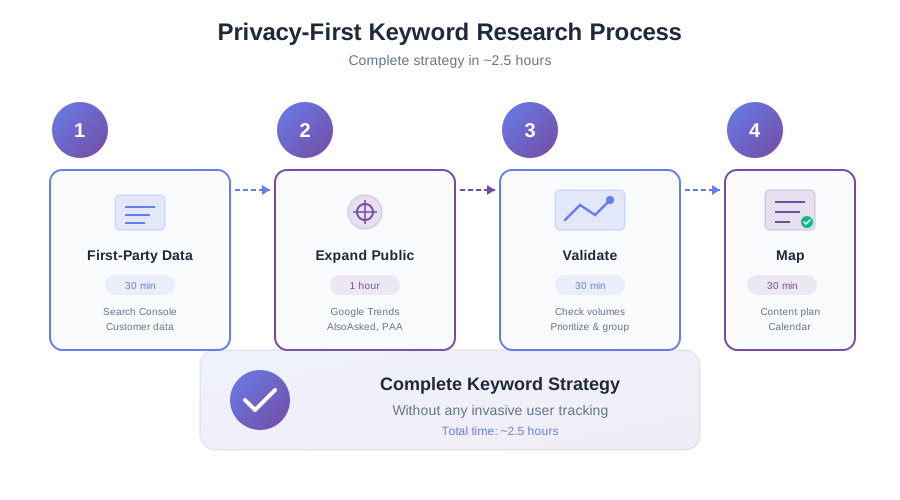
Here’s how to put this together into a repeatable process. This takes a few hours for a new topic cluster and about thirty minutes for routine content planning.
- Start with Search Console. Export all queries from the last 90 days. Sort by impressions. Identify your current ranking pages and the queries they attract. This is your baseline — the keywords you’re already associated with in Google’s eyes.
- Run autocomplete research on your seed keywords. Open incognito, type each seed, and capture the suggestions. Also run the seed through AnswerThePublic or a similar autocomplete aggregator. Add everything to a spreadsheet.
- Do a competitor gap pass. Pick two or three close peers. Run the gap analysis in Ahrefs, Semrush, or Ubersuggest. Add the gaps that make sense for your audience to your spreadsheet.
- Check Reddit and forums for natural language. Spend twenty minutes on the subreddits for your niche. Add any terms or question phrasings you encounter that aren’t already on your list.
- Categorize by intent. Mark each keyword as informational, commercial, or navigational. Informational keywords need guides and tutorials. Commercial keywords need comparisons, reviews, or clear product pages. Don’t target commercial intent with a 2,000-word educational post and wonder why it doesn’t convert.
- Prioritize by a simple score. Traffic potential (use tool volume as a rough proxy) × topical relevance to your site × estimated difficulty to rank. You don’t need a formula — a rough high/medium/low for each is enough to sort the list into what to write first.
At no point in this process did you need session recordings, heat maps, or a GA4 event tracking scheme. The data you need is already public.
What You Actually Lose by Not Tracking Users
Worth being direct about this. There are things you won’t have if you don’t track users, and it’s better to know them up front than to pretend privacy-first is cost-free.
You won’t know which specific search query led to a conversion — because Google strips that data from referrers anyway, so most GA4 implementations call it “(not provided)” and make something up from landing page attribution models. You won’t have on-site search query data unless you implement your own search — and if you do, you can log those queries server-side without cookies. You won’t have behavioral segmentation showing that “users who read 3 articles convert at 2x” — but unless you have enough traffic to run statistically significant experiments on that, this is aspiration masquerading as data.
For keyword research specifically, the gap is genuinely small. The missing piece is on-site search query data — knowing what your visitors searched for within your own site. If this matters to you, the privacy-respecting way to capture it is server-side logging of search queries with no user identifiers attached. That gives you the pattern without the surveillance.
Frequently Asked Questions
Can I do keyword research without any paid tools?
Yes. Google Search Console (free), Google Keyword Planner (free with a Google Ads account), Bing Webmaster Tools (free), autocomplete research, People Also Ask, and Reddit/forum research cost nothing. The paid tools like Ahrefs or Semrush speed up competitor analysis significantly, but they’re not required to do meaningful keyword research on a small to mid-size site.
Does using Ahrefs or Semrush for keyword research violate user privacy?
No. Those tools build their keyword databases using web crawlers and clickstream data from opt-in browser panels — not from tracking visitors on your site. Using them to research keywords doesn’t put any cookies on your visitors’ devices and doesn’t collect any personal data from your audience.
How do I track keyword rankings without invasive tools?
Google Search Console’s Performance report shows average position per query, updated daily. For more granular rank tracking, tools like Ahrefs Rank Tracker or Semrush’s Position Tracking work by querying Google from their own servers — not by putting anything on your site. Neither requires your visitors to be tracked. Check rankings weekly or fortnightly; daily rank checks are noise.
What’s the best keyword tool for privacy-first websites?
For on-site data: Google Search Console. For competitor research and volume estimates: Ahrefs or Semrush (paid), or Ubersuggest’s free tier. For question-based keywords: AnswerThePublic. None of these tools require you to track your own visitors. The right tool depends on your budget and the scale of your research — start with what’s free and add paid tools when you’ve outgrown what free provides.
How is keyword research different on a cookieless site?
Mostly it isn’t. The research phase — finding terms, estimating demand, understanding intent — doesn’t involve your visitors at all. The main difference is in measurement: you rely on Search Console and your privacy-respecting analytics tool for performance data rather than GA4’s behavioral reports. For most SEO purposes, that’s a trade-down in noise and a trade-up in clarity.
The Bottom Line
Keyword research has always been about understanding public search behavior — what questions exist, how often they’re asked, and how well the current results answer them. None of that requires you to surveil your own users. The invasive tracking that crept into modern analytics stacks solved conversion and UX problems, not keyword research problems.
Use Search Console for your existing traffic signals. Use autocomplete and People Also Ask for question discovery. Use competitor analysis tools for gap identification. Use Reddit and forums for natural language. Tie it together with a privacy-respecting analytics tool that tells you which pages are growing in organic traffic over time.
That’s a complete keyword research workflow. It respects your visitors, it’s entirely legal under GDPR and CCPA, and it doesn’t require a consent banner. If you want to go deeper on the analytics side, the guide on migrating from Google Analytics to a privacy-first alternative covers the full transition — including how to preserve the measurement capabilities that actually matter for SEO.