
Getting cookie consent right isn’t just about avoiding fines—it’s about respecting your visitors. After helping dozens of websites fix their consent implementations, I’ve seen the same mistakes repeated. Most cookie banners fail GDPR requirements in ways that seem small but carry real legal risk.
This guide covers what actually makes a cookie banner compliant, the patterns that get websites in trouble, and how to implement consent that your legal team and your users will appreciate.
What GDPR Actually Requires for Cookie Consent
Cookie consent rules come from two sources working together: the ePrivacy Directive (often called the “Cookie Law”) and GDPR. The ePrivacy Directive requires consent for storing cookies on devices. GDPR defines what valid consent means.
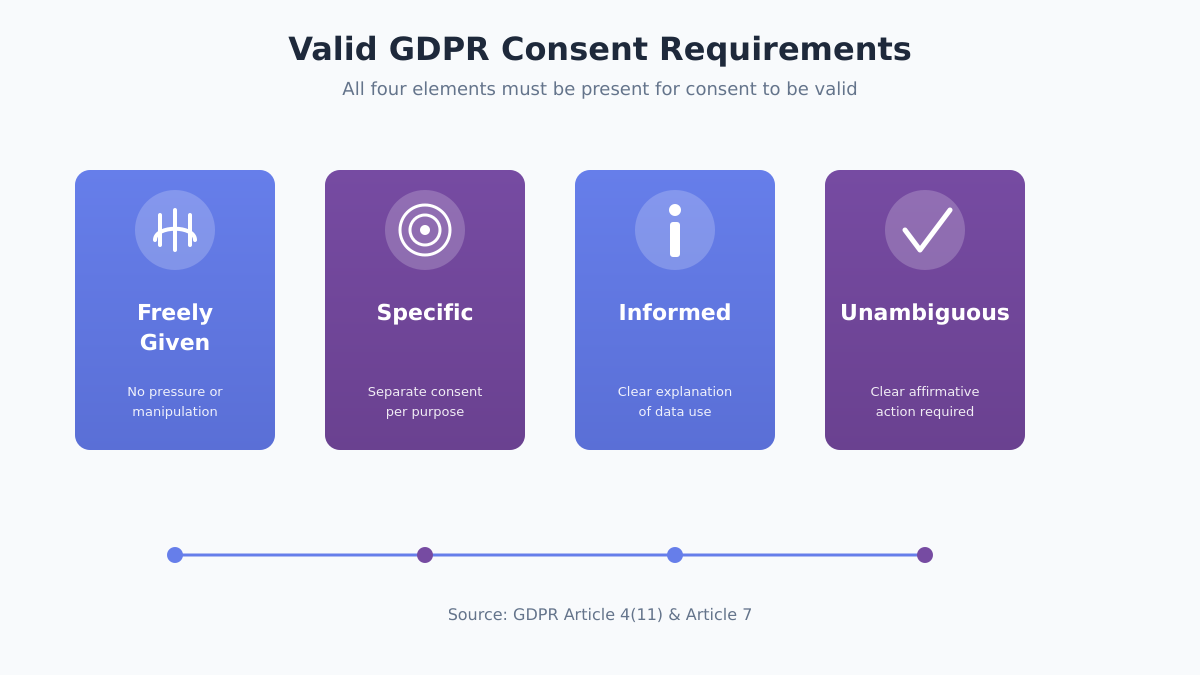
Valid consent under GDPR must be:
- Freely given — Users can’t be forced or manipulated into accepting
- Specific — Separate consent for different purposes (analytics vs. marketing)
- Informed — Clear explanation of what cookies do and who uses the data
- Unambiguous — Requires a clear affirmative action (clicking, toggling)
The European Data Protection Board (EDPB) has repeatedly clarified that scrolling, continuing to browse, or closing a banner does NOT constitute valid consent. Users must actively click to accept.
Which cookies need consent:
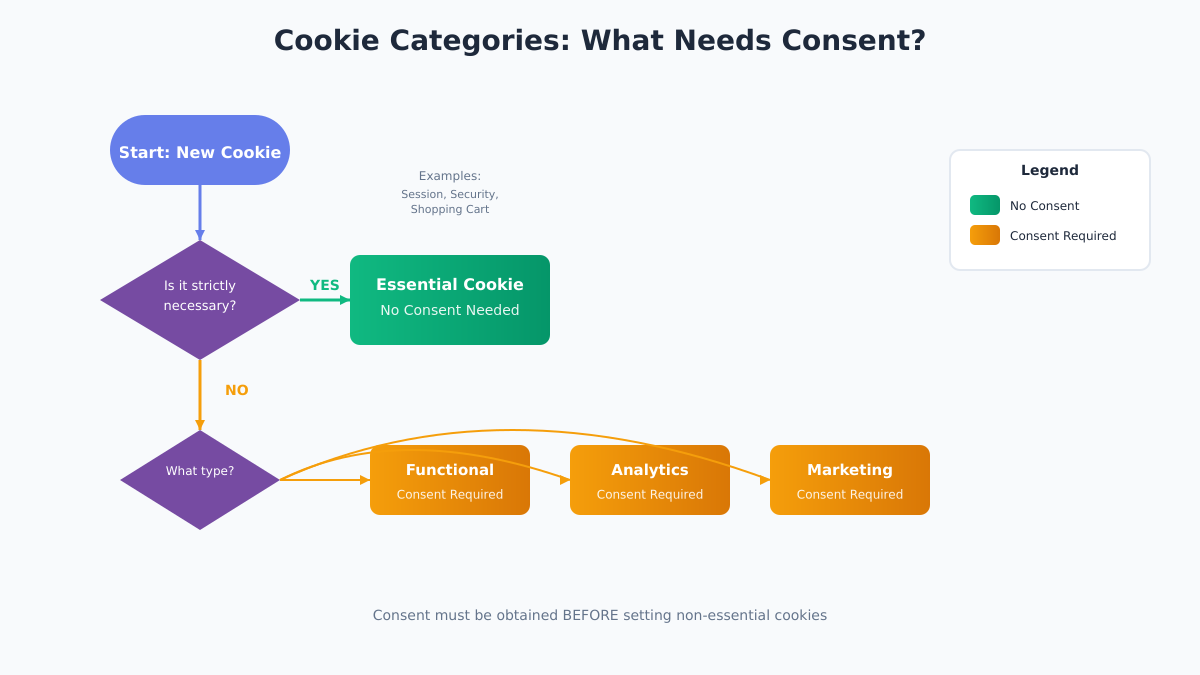
Not every cookie requires consent. The ePrivacy Directive exempts cookies that are “strictly necessary” for a service the user explicitly requested. Everything else needs consent BEFORE the cookie is set.
| Cookie Type | Consent Required | Examples |
|---|---|---|
| Strictly necessary | No | Session cookies, security tokens, shopping cart |
| Functional | Yes | Language preferences, user settings |
| Analytics | Yes | Google Analytics, Plausible, Matomo |
| Marketing | Yes | Ad tracking, retargeting pixels |
Even privacy-focused analytics tools like Plausible or Fathom technically require consent under ePrivacy in most EU countries, though some (like Germany) have more nuanced interpretations for cookieless analytics.
The 7 Most Common Cookie Banner Mistakes
After reviewing hundreds of cookie implementations, these mistakes appear constantly—and each one can invalidate your consent collection.
1. Pre-ticked checkboxes
The Planet49 ruling from the European Court of Justice in 2019 made this crystal clear: pre-ticked boxes don’t count as consent. Users must actively check the box themselves.
Wrong: Checkboxes for “Analytics” and “Marketing” already selected
Right: All non-essential categories unchecked by default
2. Missing or hidden “Reject All” button
French regulator CNIL fined Google €150 million partly because rejecting cookies required multiple clicks while accepting took just one. The reject option must be equally prominent and easy to use.
3. Cookie walls that block content
Forcing users to accept cookies to access your site generally violates the “freely given” requirement. The EDPB’s guidelines on consent specifically address this—consent isn’t free if there’s no real choice.
4. Confusing language and dark patterns
Using “Accept” as a bright green button and “Manage Preferences” as gray text creates unequal prominence. Both options must be visually equivalent.
5. Auto-accepting on scroll or timer
Some banners claim that continuing to use the site means consent. This directly contradicts GDPR’s requirement for “clear affirmative action.”
6. Not keeping consent records
GDPR Article 7(1) requires you to demonstrate that users consented. You need timestamped records of who consented, when, and what they agreed to.
7. Setting cookies before consent
Analytics and marketing scripts often fire immediately on page load. If non-essential cookies are set before the user clicks “Accept,” your consent mechanism is fundamentally broken.
| Mistake | Risk Level | How to Fix |
|---|---|---|
| Pre-ticked boxes | High | Uncheck all non-essential by default |
| No “Reject All” | High | Add prominent reject button |
| Cookie wall | High | Allow access without consent |
| Dark patterns | Medium-High | Equal visual weight for all options |
| Auto-accept | High | Require explicit click |
| No records | Medium | Implement consent logging |
| Cookies before consent | High | Block scripts until consent given |
Essential vs. Non-Essential Cookies: What Needs Consent
Before building your cookie banner, audit every cookie your site sets. This determines what appears in your consent interface.
Strictly Necessary Cookies (No Consent Needed)
These cookies are exempt from consent requirements because your site can’t function without them. But “function” has a narrow definition—it means features the user explicitly requested.
Exempt examples:
- Shopping cart cookies for an e-commerce site
- Authentication session cookies
- Security cookies (CSRF tokens)
- Load balancing cookies
- Cookie consent preference storage
NOT exempt (even if you think they’re essential):
- Analytics cookies—even basic ones
- Social media widgets
- Live chat unless user initiates
- A/B testing cookies
Analytics Cookies
Yes, even privacy-friendly analytics tools typically require consent in the EU. Some analytics providers like Plausible operate without cookies at all, which can simplify compliance. Others like Matomo can be configured for cookie-less tracking.
If you want analytics without consent banners, consider switching to a cookieless analytics solution that doesn’t use cookies or track individuals.
Marketing and Advertising Cookies
These always require consent. Third-party advertising cookies from networks like Google Ads or Facebook create the most complex consent scenarios because they involve data sharing with external parties.
Cookie Audit Checklist:
- List every cookie your site sets
- Identify the purpose of each cookie
- Determine who sets it (first-party or third-party)
- Note the expiration time
- Classify as strictly necessary, functional, analytics, or marketing
- Document in your cookie policy
Designing a Compliant Cookie Banner
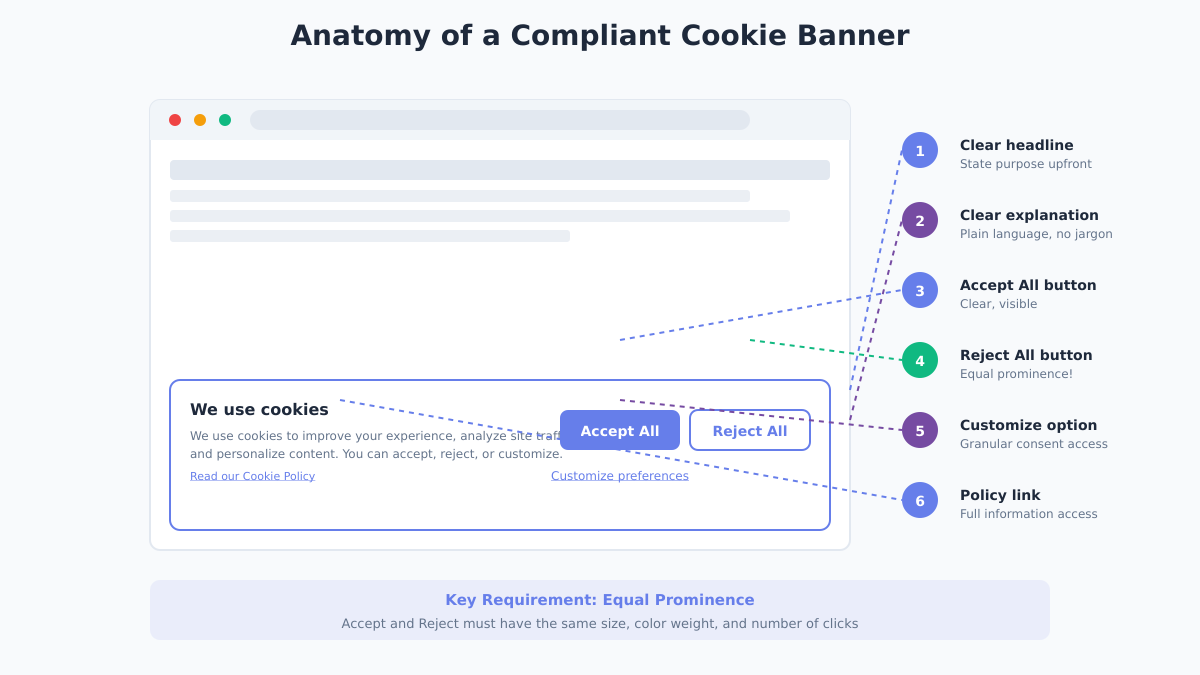
A compliant cookie banner needs specific elements arranged in a way that gives users genuine choice. Here’s the anatomy of a legally sound design.
Required Elements
1. Clear headline stating purpose
Not just “We use cookies” but what you use them for.
2. Explanation of cookie categories
Brief description of each type and their purpose.
3. Accept All button
Clearly labeled, normal prominence.
4. Reject All button
Equally prominent as Accept. Same size, similar visual weight, not hidden.
5. Manage Preferences / Customize option
Links to granular controls.
6. Link to full cookie policy
Complete information must be accessible.
Placement and Timing
Banner should appear on first visit before any non-essential cookies load. Common placements:
- Bottom bar — Less intrusive but can be overlooked
- Top bar — Visible but can feel aggressive
- Center modal — Ensures attention but interrupts (avoid blocking content entirely)
Whatever placement you choose, ensure it doesn’t constitute a “cookie wall” that prevents access to content.
Color and Visual Design
The CNIL’s guidelines on cookie consent emphasize that design shouldn’t manipulate users toward accepting.
Equal prominence means:
- Accept and Reject buttons are the same size
- Similar color saturation (not bright vs. gray)
- Same location prominence (not Accept at top, Reject buried below)
- Same number of clicks to complete either action
Avoid:
- Green for Accept, gray for Reject
- “Accept All” as button, “Reject” as small text link
- Hiding Reject in a submenu
Clear Language
Write for humans, not lawyers. Avoid jargon.
Instead of: “We utilize cookies and similar tracking technologies to enhance your browsing experience and deliver personalized content pursuant to…”
Write: “We use cookies to remember your preferences, understand how you use our site, and show relevant ads. You can accept all, reject non-essential cookies, or customize your choices.”
Implementing Granular Consent Options
GDPR requires specific consent—users must be able to consent to some purposes while rejecting others. A single “Accept All” without alternatives fails this requirement.
Category-Level Toggles
The preference center should show categories with individual toggles:
Strictly Necessary    [Always On - Cannot Toggle]
Functional Cookies    [Toggle Off/On]
Analytics Cookies     [Toggle Off/On]
Marketing Cookies     [Toggle Off/On]
Each category needs a brief, plain-language explanation of what it includes.
Storing Consent Properly
When a user makes a choice, store it in a way that:
- Doesn’t require additional cookies you don’t have consent for
- Persists across sessions
- Can be exported for audit purposes
Basic approach using localStorage with a consent cookie:
// Store consent preferences
function saveConsent(preferences) {
  const consent = {
    timestamp: new Date().toISOString(),
    categories: preferences,
    version: '1.0'
  };

  // Essential cookie to remember preference
  document.cookie = `consent=${JSON.stringify(consent)}; max-age=31536000; path=/; SameSite=Lax`;

  // Enable/disable scripts based on consent
  if (preferences.analytics) {
    loadAnalytics();
  }
  if (preferences.marketing) {
    loadMarketing();
  }
}
Server-Side Consent Logging
For audit purposes, log consent events server-side:
{
  "user_id": "anonymous_hash_abc123",
  "timestamp": "2026-01-12T14:30:00Z",
  "consent_version": "1.0",
  "categories_accepted": ["functional", "analytics"],
  "categories_rejected": ["marketing"],
  "banner_version": "2.1",
  "ip_country": "DE"
}
This provides the proof required by Article 7(1) without storing personal data.
Consent Management Platforms: When You Need One
You have two options: build consent management yourself or use a dedicated Consent Management Platform (CMP).
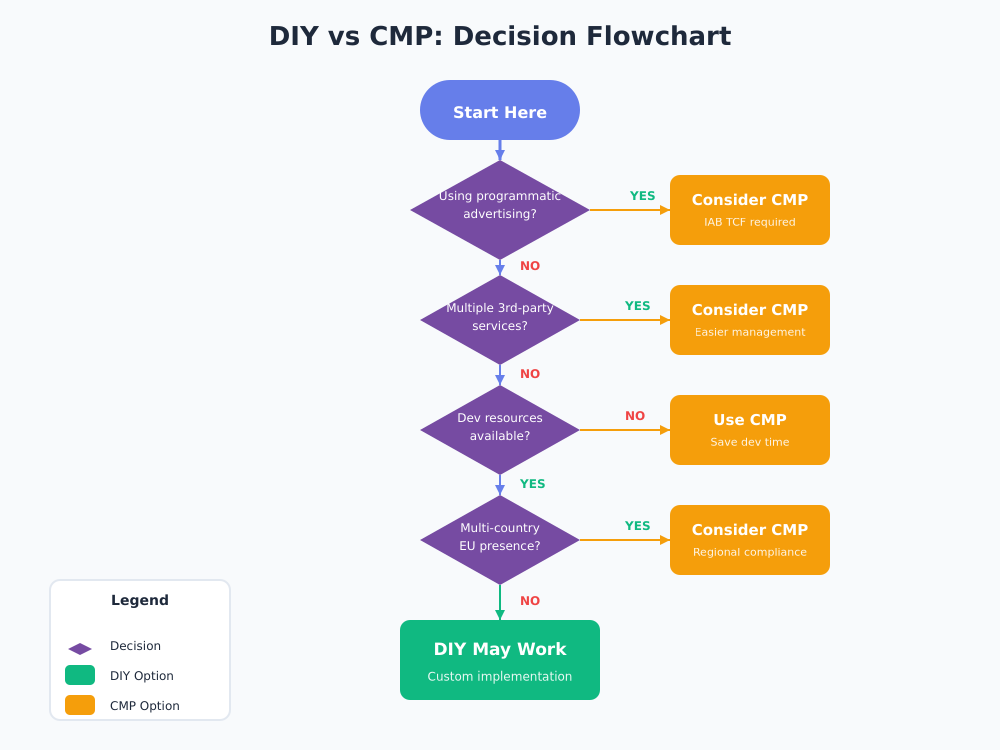
When DIY Works
If your site:
- Uses few cookies (mainly essential + one analytics)
- Doesn’t use third-party advertising
- Has development resources
- Operates in limited jurisdictions
A custom implementation can be simpler and give you full control.
When You Need a CMP
Consider a dedicated platform if:
- You use multiple third-party services
- You run programmatic advertising
- You need IAB TCF 2.2 compliance for ad networks
- You operate across many EU countries
- You need detailed consent reporting
Privacy-Respecting CMP Options
Several CMPs focus on privacy-friendly implementations:
| Platform | Privacy Focus | Open Source | Pricing |
|---|---|---|---|
| Cookiebot | Strong | No | Free tier, then paid |
| Osano | Strong | No | Free tier available |
| Termly | Good | No | Free tier available |
| Klaro | Strong | Yes | Free (self-hosted) |
If you’re considering a CMP, check out our tool reviews section for detailed comparisons.
Storing and Proving Consent
Under GDPR, the burden of proof falls on you. If a regulator asks whether a specific user consented, you need to demonstrate it.
What Records to Keep
For each consent event:
- Timestamp of when consent was given
- Which version of the consent notice was shown
- What categories were accepted/rejected
- Some form of user identifier (can be anonymized)
- How consent was collected (banner version)
How Long to Store
Keep consent records for as long as you process data based on that consent, plus time for potential audits. ICO guidance suggests maintaining records to demonstrate compliance for the duration of processing.
Re-Consent Requirements
You must obtain new consent if:
- You add new cookie categories
- You change data processing purposes significantly
- Your consent mechanism was found non-compliant
- Enough time has passed (industry standard: 6-12 months)
Dark Patterns to Avoid (With Real Examples)
The EDPB’s guidelines on deceptive design patterns identify specific manipulation techniques that invalidate consent.
Recent Enforcement
- Google (France) — €150M fine for making rejection harder than acceptance
- Amazon (Luxembourg) — €746M for targeting practices (related to consent)
- Meta (Ireland) — Multiple fines for consent mechanism failures
Common Dark Patterns in Cookie Banners
| Dark Pattern | What It Looks Like | Compliant Alternative |
|---|---|---|
| Misdirection | Bright “Accept All,” gray “Options” | Same visual weight for all choices |
| Confirm shaming | “No, I don’t care about my experience” | Neutral “Reject All” |
| Hidden rejection | Reject buried in submenu | Reject on first layer |
| Forced action | Accept to access content | Allow content access without consent |
| Privacy maze | 5+ clicks to reject | Same clicks for accept and reject |
| Nagging | Banner appears every page | Show once, respect choice |
The principle is straightforward: if your design pushes users toward accepting, it undermines the “freely given” requirement.
FAQ
Do I need a cookie banner if I only use essential cookies?
If you truly only use strictly necessary cookies, you don’t need a consent banner. However, you should still inform users about these cookies in your privacy policy. Most sites use at least one non-essential cookie (analytics, preferences, etc.), which triggers the consent requirement.
Can I use “legitimate interest” for analytics cookies?
No. The ePrivacy Directive requires consent for non-essential cookies regardless of your legal basis under GDPR. Legitimate interest can be a valid basis for data processing, but it doesn’t bypass the cookie consent requirement. This is a common misconception—the cookie law stands separately from GDPR’s legal bases.
How often should users see the consent banner?
Once per decision. After a user accepts or rejects, don’t show the banner again until:
- Their consent expires (typically 6-12 months)
- You change your cookie categories significantly
- They clear their browser data
- They specifically want to change preferences (provide an accessible link)
What happens if someone withdraws consent?
You must make withdrawal as easy as giving consent. Typically this means:
- Accessible “Cookie Preferences” link in footer
- Immediately stop using non-essential cookies for that user
- Don’t make withdrawal harder than the original consent
Is a cookie wall ever legal?
Generally no. Forcing users to accept cookies to access content violates the “freely given” requirement. Some edge cases exist (like services that genuinely require certain cookies to function), but for most websites, cookie walls are non-compliant.
Implementation Checklist
Use this checklist to audit your current implementation or guide a new one:
Before Launch:
- Audit all cookies your site sets
- Classify each cookie by category
- Block non-essential cookies until consent is given
- Create clear, jargon-free category descriptions
- Write a comprehensive cookie policy
Banner Design:
- Accept All button present
- Reject All button equally prominent
- Manage Preferences option available
- Link to cookie policy
- Mobile-responsive design
- No dark patterns
Functionality:
- Non-essential scripts don’t load before consent
- Consent choice is stored appropriately
- Server-side logging captures consent events
- Users can change preferences later
- Preference link accessible in footer
Ongoing:
- Re-show banner when categories change
- Audit consent logs quarterly
- Test that blocked scripts stay blocked
- Update consent text when adding new cookies
- Review for dark patterns annually
Ready to implement proper consent? Start by auditing your current cookies—you might be surprised what third-party scripts have added without your knowledge. If you’re looking to simplify compliance by reducing your cookie footprint, explore our guide to privacy-first analytics alternatives that don’t require consent in many cases.
For more on marketing without invasive tracking, browse our Cookieless Marketing category.


Leave a Reply